SSD vs HDD: Which Storage Is Best for Your PC in 2026?
SSD vs HDD in Nepal—learn which storage is best for your PC. Visit MAXELL COMPUTER Putalisadak for upgrades and expert advice.
By Content Writer | Content Writer
Published
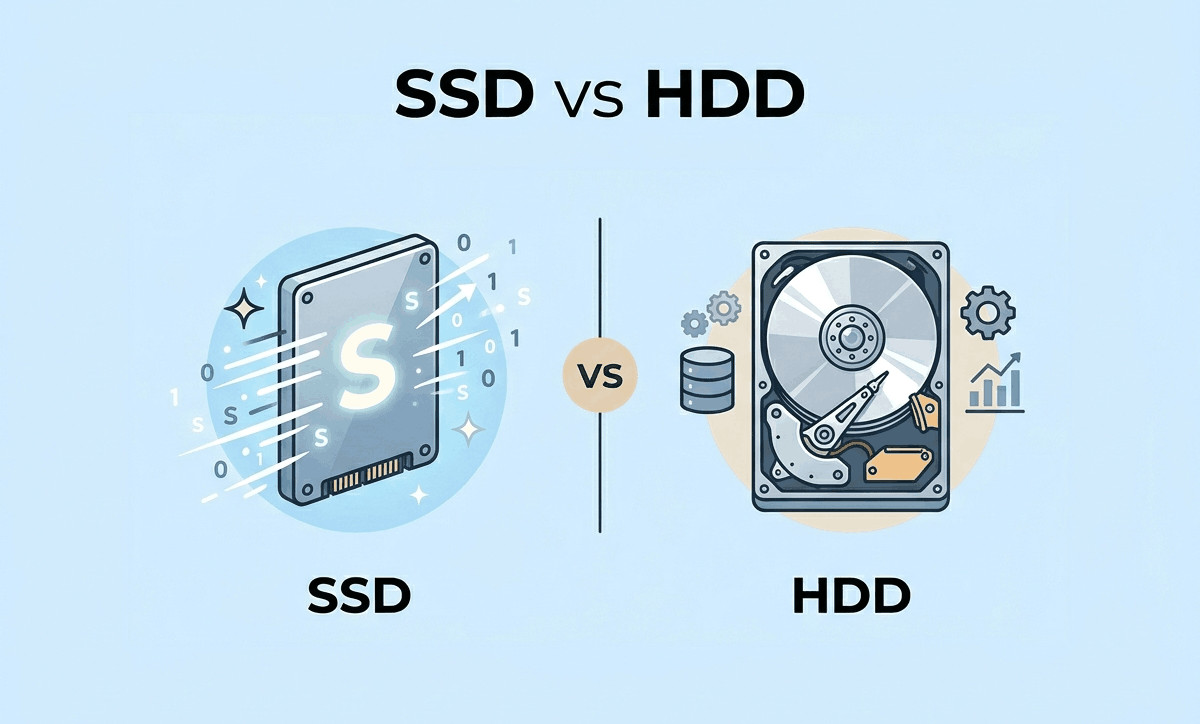
Table of contents(12)
When upgrading or buying a new laptop, one of the most important decisions is choosing between SSD vs HDD storage. This choice directly affects your laptop’s speed, performance, and overall user experience.
If you’ve ever wondered why some laptops boot in seconds while others take minutes, the answer often lies in the type of storage. For buyers searching for a reliable laptop shop in Putalisadak or comparing laptop price in Nepal, understanding this difference can help you make a smarter investment.
In this guide, we’ll break down everything you need to know about SSDs and HDDs in 2026—and help you decide which is best for your needs.
What Is an SSD and HDD?
💾 What Is an HDD (Hard Disk Drive)?
An HDD is a traditional storage device that uses spinning disks to read and write data.
Key characteristics:
- Mechanical components
- Slower read/write speeds
- Larger storage capacity at lower cost
- Common in older laptops and budget systems
⚡ What Is an SSD (Solid State Drive)?
An SSD is a modern storage device with no moving parts, using flash memory for faster data access.
Key characteristics:
- No moving parts
- Much faster performance
- More durable and energy-efficient
- Standard in most modern laptops
SSD vs HDD: Key Differences Explained
| Feature | SSD (Solid State Drive) | HDD (Hard Disk Drive) |
|---|---|---|
| Speed | Very fast | Slow |
| Boot Time | 5–15 seconds | 30–60+ seconds |
| Durability | High (no moving parts) | Lower (mechanical parts) |
| Noise | Silent | Can be noisy |
| Power Usage | Low | Higher |
| Storage Capacity | Moderate | High (more GB per cost) |
| Price | Higher per GB | Lower per GB |
SSD vs HDD: Which One Should You Choose?
The answer depends on how you use your laptop or PC.
👉 Choose SSD If You Want:
- Faster boot and load times
- Smooth multitasking
- Better performance for modern applications
- Improved battery life in laptops
👉 Choose HDD If You Want:
- More storage at a lower cost
- To store large files like movies or backups
- A secondary storage option
👉 Best Option in 2026: Use Both
Many users in Nepal now prefer:
- SSD (for OS and software)
- HDD (for storage and backups)
This setup gives you the best of both speed and capacity.
Why SSD Is Becoming the Standard in Nepal
In recent years, SSDs have become more affordable, making them a popular choice in every laptop shop in Kathmandu.
Key reasons:
- Faster performance for online classes and office work
- Better experience with modern software
- Improved reliability in Nepal’s varying power conditions
Even budget laptops now often include SSDs, reflecting changing market trends.
Laptop Buying Tips for Storage (Nepal Edition)
If you're planning to buy or upgrade your laptop, keep these tips in mind:
✅ 1. Always Prioritize SSD for Performance
Even a smaller SSD is better than a large HDD for speed.
✅ 2. Check Storage Type Before Buying
Some sellers may not clearly mention whether it’s SSD or HDD.
✅ 3. Plan for Future Upgrades
Choose laptops that allow adding SSD or HDD later.
✅ 4. Compare Laptop Price in Nepal
Prices may vary depending on specifications, availability, and market conditions.
✅ 5. Ask for Expert Advice
A trusted laptop shop in Putalisadak can guide you based on your needs.
SSD vs HDD for Different Users
🎓 Students
- SSD is highly recommended for speed and portability
- 256GB or 512GB SSD is usually sufficient
👨💼 Office Users
- SSD improves productivity and multitasking
- Faster file access and software performance
🎮 Gamers
- SSD reduces game loading times
- HDD can be used for storing large game libraries
🎬 Content Creators
- SSD for editing software
- HDD for storing large video files
Common Mistakes to Avoid
- Buying a laptop with only HDD in 2026
- Ignoring upgrade options
- Choosing storage based only on capacity
- Not checking compatibility for SSD upgrades
- Overpaying without understanding real needs
Why This Matters for Laptop Buyers in Kathmandu
In Kathmandu, where laptops are a major investment, choosing the right storage can:
- Extend your laptop’s lifespan
- Improve daily performance
- Save money on future upgrades
Whether you’re a student in Putalisadak or a professional working in Kathmandu, SSD storage can significantly enhance your experience.
Why Visit MAXELL COMPUTER Putalisadak?
If you're unsure about SSD vs HDD, visiting MAXELL COMPUTER Putalisadak can make your decision much easier.
Here’s what you can expect:
- 🧑💻 Expert Consultation
Get honest advice tailored to your usage - 💻 Upgrade Services
SSD installation, data transfer, and performance optimization - 🔧 Laptop Repair Support
Diagnose slow systems and recommend solutions - 📍 Prime Location
Conveniently located in Putalisadak, Kathmandu - 🤝 Trusted Local Experience
Known as a helpful best laptop store in Kathmandu
Whether you're upgrading an old laptop or buying a new one, MAXELL COMPUTER ensures you get the right solution.
Ready to Upgrade Your Laptop Storage?
If your laptop feels slow or outdated, switching from HDD to SSD can make a huge difference.
👉 Visit MAXELL COMPUTER Putalisadak today to:
- Upgrade your laptop with an SSD
- Compare storage options
- Get expert buying advice
- Explore laptops and accessories
FAQs
1. Is SSD better than HDD for laptops in 2026?
Yes, SSD is faster, more reliable, and ideal for modern usage.
2. Can I replace HDD with SSD in my laptop?
In most cases, yes. It’s best to confirm compatibility first.
3. How much SSD storage do I need?
For most users, 256GB to 512GB is sufficient.
4. Is HDD still useful today?
Yes, mainly for storing large files and backups.
5. Where can I upgrade my laptop in Putalisadak?
You can visit MAXELL COMPUTER Putalisadak for professional upgrade services. You can visit our Contact Us page or contact us directly on our WhatsApp : +977 9811 770 082
Conclusion
When comparing SSD vs HDD, the choice is clear for most users in 2026—SSD offers significantly better speed, reliability, and overall performance.
For buyers searching for a laptop shop in Kathmandu or evaluating laptop price in Nepal, understanding storage options is essential for making a smart purchase.
If you want expert advice, reliable upgrades, or a wide range of laptops and accessories, visit MAXELL COMPUTER Putalisadak. Making the right storage choice today can transform your entire computing experience for years to come.
Last updated July 17, 2026 · 5 min read